· 6 min read
WhatsApp AI chatbot: the 2026 rules, the costs and a real example
A WhatsApp AI chatbot is an AI agent connected to your business number through WhatsApp's official platform. It answers customers, asks your questions and hands serious buyers to a person. Meta still allows this for businesses in 2026, but since 1 October it charges for service replies past the first 1,000 a month, so many older guides have the cost wrong.
What a WhatsApp AI chatbot does
An older WhatsApp bot gives people buttons and a fixed menu. An AI chatbot reads what they typed, in the way they typed it, and answers from your own information. It can ask one question at a time, skip what's already been said, and sort the leads as they come in.
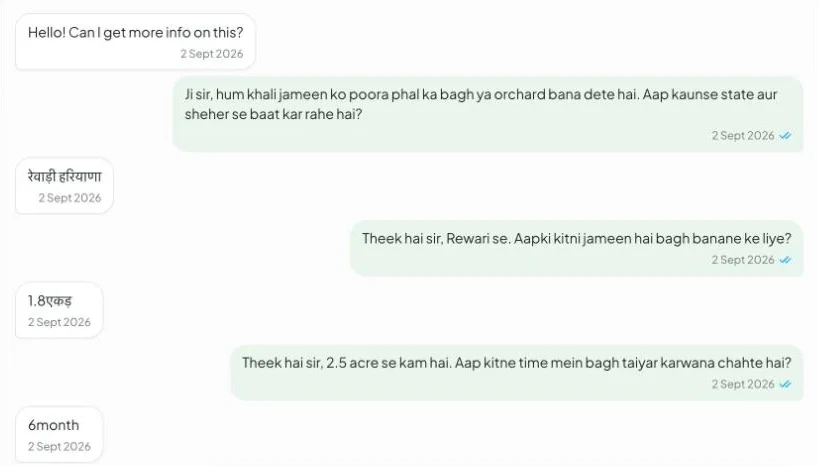
The strongest use we've seen is answering ad leads. Someone taps your ad, lands in WhatsApp and expects a reply now. Nursery Hut, a plant nursery in India, was getting hundreds of messages a day from its Meta ads, and staff answered each one by hand. The typical first reply took 51 minutes.

WhatsApp AI bot
We built an AI agent on the nursery's own number. It replies in the customer's language, asks the questions, scores each lead and hands serious buyers to the manager.2.1stypical reply, down from 51 minutes by hand809WhatsApp leads in one dashboard38hot leads handed to the manager in the first 5 daysRead the case studyWhat Meta allows in 2026
Meta's platform terms bar AI companies from offering general-purpose assistants on WhatsApp when the AI is the main thing on offer. That rule took effect on 15 January 2026. Meta told TechCrunch the change doesn't affect businesses using AI to serve their own customers.
So a bot for your own support, sales or bookings is fine. Keep it tied to your business, and follow the messaging policy. Three rules matter most:
- Get permission. You can only contact people who gave you their number and agreed to hear from you. Someone who messages you first has started the chat, but a bought list breaks the rule.
- Offer a way to reach a person. Automated replies need “prompt, clear, and direct escalation paths”, such as a handover to a human agent, a phone number or an email address.
- Respect the 24-hour window. When a customer messages you, a 24-hour window opens and you can reply freely. Outside it, you can only send pre-approved templates.
Our agents also say they're an AI at the start. People mind being fooled far more than they mind being helped by software.
What it costs since October 2026
Meta charges per delivered message. From 1 November 2024, replies inside the 24-hour window were free. That ended on 1 October 2026. Each business number now gets 1,000 free service messages a month, and Meta charges from the 1,001st. Utility templates sent inside the window, which had been free since July 2025, are charged too.
| Message | US | UK | Australia |
|---|---|---|---|
| Service reply, after 1,000 free a month | $0.0034 | $0.0220 | $0.0113 |
| Utility template, like an order update | $0.0034 | $0.0220 | $0.0113 |
| Marketing template | Not listed | $0.0635 | $0.0842 |
| Message from a customer to you | Free | Free | Free |
These figures are from Twilio's price list, dated September 2026, and YCloud confirms that service messages are priced at the utility rate. The rate depends on where your customer is. Meta changes its rates often, so check the rate card before you budget. Twilio's list also shows no marketing rate for US numbers, so check that before planning a US campaign.
Here's a worked example. Say your bot sends 5,000 service replies a month to UK customers. The first 1,000 are free, so you pay for 4,000 at $0.022, which is $88 a month. For US customers the same volume comes to $13.60.
Ads get a better deal. When someone reaches you through a click-to-WhatsApp ad, Meta opens a free entry point window in which it doesn't charge for your messages. Its developer docs say the window can stay open for up to 7 days, and its pricing page says 72 hours. Plan on 72.
Those are Meta's fees. A reseller may add its own: Twilio charges $0.005 per message, in or out, on top of Meta's fee. The AI company charges for each reply as well.
Buy a tool or build your own
Start with a tool if your needs are simple. respond.io, for example, starts at $99 a month, or $79 a month billed yearly (checked 3 November 2026). Meta also sells its own Meta Business Agent, at $2.00 per million tokens, which Meta puts at about 4 to 5 cents a message. Those messages stay charged inside the free ad window.
A tool usually fits when you answer common questions in one language and your team can work in the tool's inbox. A custom agent starts to pay for itself when:
- Your questions and scoring rules are your own, and they decide who gets called first.
- Customers mix languages. Nursery Hut's agent matches Hindi, Hinglish or English, and understands voice notes.
- The answers live in your own systems, like stock, orders or a CRM.
- You want your own dashboard, with a ranked call list and a record of which ads bring the leads.
You can usually keep your number. Meta's coexistence setup lets a business keep using the WhatsApp Business app alongside the platform, with chat history in sync. Messages sent from the app stay free. There are trade-offs: group chats don't sync, and broadcast lists stop working as before. It has to be set up through a Meta partner, and it's how we run Nursery Hut's number, so staff can still reply from the phone.
What we learned from Nursery Hut
The agent went live on 2 September 2026. In its first five days it handled 152 chats and 1,002 messages with 0 failures. By 28 October the dashboard held 809 leads, and 258 had finished the questions or reached the manager. Four choices made the most difference.
- It never makes up a price. It sends the 58-page catalogue instead, and the manager talks money.
- It steps back. When staff reply from the phone, the agent stays quiet for 6 hours.
- It has a fallback. If the AI ever fails, a fixed question flow with buttons takes over, so no lead goes unanswered.
- It sorts. Every lead is scored hot, warm or cool, so the manager starts the day from a ranked list and not a long scroll through WhatsApp.
How to set one up
- Pick one job. Answering ad leads is a good first one, because you can see the result in days.
- Write down the questions your best salesperson asks, in order.
- Decide when a person takes over, and who gets the alert.
- List what the bot must never do, like quoting prices or promising dates.
- Test it on your real questions before it goes live, and log every conversation so you can see what it said.
- Go live on one ad, read the chats daily for a week, then widen it.
Questions
Are WhatsApp AI chatbots allowed?
Yes, for a business serving its own customers. Meta's terms bar AI companies from offering general-purpose assistants on the platform. They don't stop you using AI for your own support, sales or bookings.
Is a WhatsApp AI chatbot free?
No. Each number gets 1,000 free service messages a month, then Meta charges per message. You also pay the AI company for each reply, plus any tool or reseller fee.
Can I keep my WhatsApp number?
Usually, yes. Meta's coexistence setup keeps the WhatsApp Business app working on the same number, with a few limits: group chats don't sync and broadcast lists change.
Can a WhatsApp chatbot understand voice notes?
Yes, if it's built to. Nursery Hut's agent understands voice notes and replies in the customer's language and script.
Related work and pages
Sources
Every outside fact above was checked on 3 November 2026. Prices and rules change, so confirm them before you decide.
- Meta: WhatsApp Business Platform pricing, updated 1 October 2026
- WhatsApp Business: platform pricing
- Meta: Terms for WhatsApp Business Platform, section 4.7, updated 23 September 2026
- WhatsApp Business Messaging Policy, updated 23 September 2026
- Meta: onboarding WhatsApp Business app users (coexistence)
- TechCrunch: WhatsApp changes its terms to bar general-purpose chatbots, 18 October 2025
- Twilio: WhatsApp pricing, current as of September 2026
- YCloud: WhatsApp API pricing update, 1 October 2026
- respond.io: pricing